 Cloud Ops Chronicles
I Automated My Tech Watch with an AI-Generated Podcast (Gemini & Cloud Run)
- The “Serverless” Architecture
- Step 1: The Data Source (BigQuery)
- Step 2: The Screenwriter (Gemini 3 Pro)
- Step 3: The Audio Studio (Gemini 2.5 Flash TTS)
- Step 4: The Graphic Designer (Imagen 3)
- Step 5: Distribution (FastAPI & RSS)
- Step 6: Infrastructure as Code (Terraform)
- Step 7: The CI/CD Pipeline (GitLab CI & Cloud Deploy)
- The Cost (FinOps)
- Conclusion
Don’t have time to read the hundreds of release notes published by Google Cloud every week? Neither do I. That’s why I created the GCP News Podcast.
🎙️ Listen to the final result here: podcast.kapable.info
This project isn’t just a demo, it’s a fully automated “Serverless” production pipeline that:
- Retrieves raw technical news.
- Scripts a dialogue between two virtual experts (Marc and Sophie).
- Generates audio with stunning realism (intonations, laughter, pauses).
- Creates unique album art for each episode.
- Publishes everything to the web and podcast platforms (Spotify, etc.).
Here is how I built this system.
The “Serverless” Architecture
The system is designed to cost almost zero when it’s not running. It relies on an event-driven architecture and managed services.
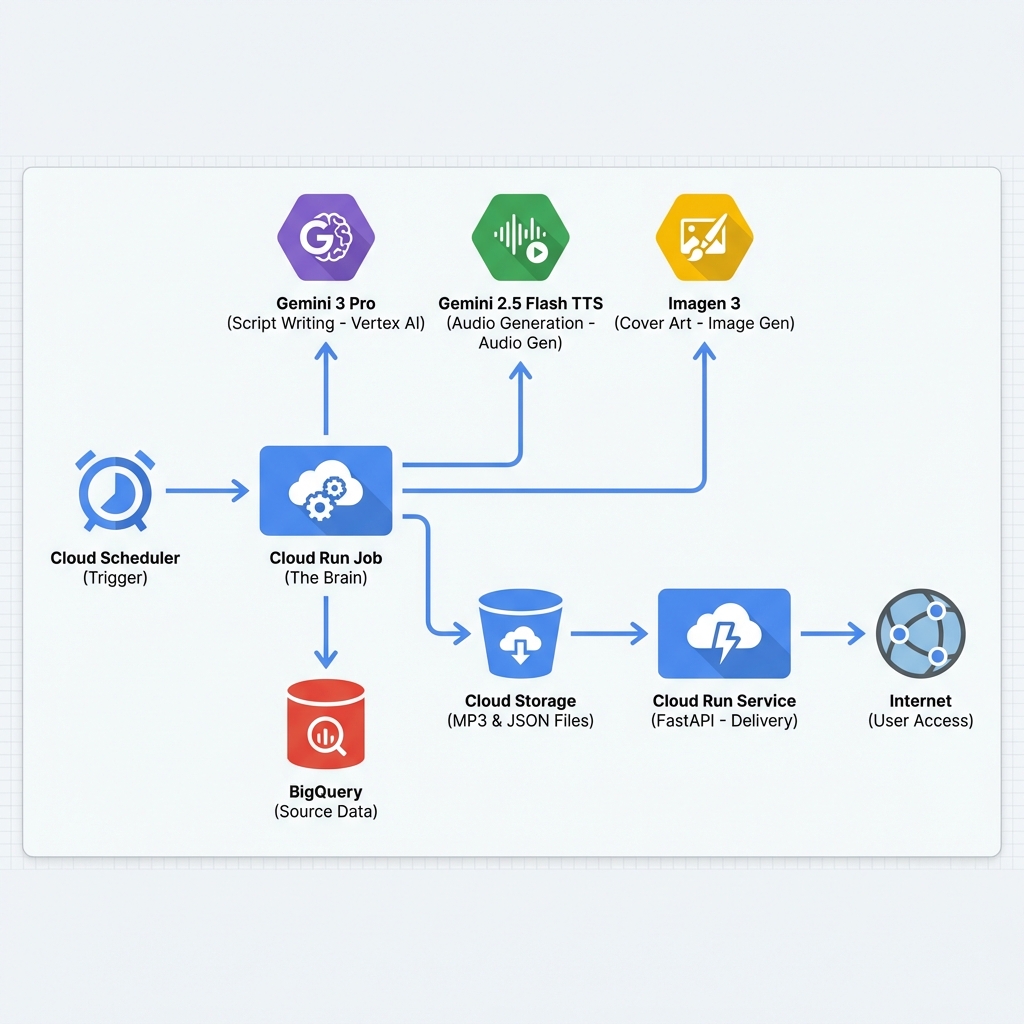
The Code (Open Source)
All the code is available on GitLab: matgou/podcast-generator.
It is divided into two parts:
* generator/: The Python batch script that creates the episode.
* frontend/: The FastAPI web interface to listen to episodes.
Step 1: The Data Source (BigQuery)
Unlike many projects that do “scraping”, here we use a clean source of truth: Google’s public BigQuery dataset.
The script executes a simple SQL query to retrieve everything that has changed in the last 7 days.
QUERY = """
    SELECT description, published_at, product_name
    FROM `bigquery-public-data.google_cloud_release_notes.release_notes`
    WHERE published_at > DATE_SUB(CURRENT_DATE(), INTERVAL 7 DAY)
    ORDER BY published_at DESC
"""
This gives us a raw list of text, often very dry and technical. That’s where AI comes in.
Step 2: The Screenwriter (Gemini 3 Pro)
We inject these raw notes into Gemini 3 Pro with a very specific system prompt (prompt_template.txt).
The goal is not to summarize, but to script. * Marc is the technical expert, precise and factual. * Sophie is the curious host, asking the questions the listener would ask.
One of the key features used here is Grounding with Google Search. This allows Gemini to verify facts and add links to official documentation in the episode metadata.
// Example of expected structured JSON output from Gemini
{
  "title": "Cloud Run speeds up and BigQuery gets safer",
  "summary": "This week, Marc and Sophie discuss the new instances...",
  "script": "Sophie: Hello everyone! ... Marc: Exactly, and it's major...",
  "image_prompt": "An abstract representation of a fast server race in a neon city..."
}
Step 3: The Audio Studio (Gemini 2.5 Flash TTS)
This is the most impressive part. We don’t use the old robotic “Text-to-Speech”. We use the Gemini 2.5 Flash TTS model (still in preview), capable of generating multiple speakers in the same audio stream.
The prompt defines the voice personalities:
* Marc uses the Fenrir voice.
* Sophie uses the Laomedeia voice.
The Python script directly calls the Vertex AI REST API to generate the audio.
# Simplified API call extract
payload = {
    "contents": [{"parts": [{"text": script_text}]}],
    "generationConfig": {
        "speechConfig": {
            "multiSpeakerVoiceConfig": {
                "speakerVoiceConfigs": [
                    {"speaker": "Marc", "voiceConfig": {"prebuiltVoiceConfig": { "voiceName": "Fenrir" }}},
                    {"speaker": "Sophie", "voiceConfig": {"prebuiltVoiceConfig": { "voiceName": "Laomedeia" }}}
                ]
            }
        }
    }
}
Step 4: The Graphic Designer (Imagen 3)
To make the podcast visual on platforms, we need a cover. Gemini (the screenwriter) has already generated an image_prompt based on the episode content.
We pass this prompt to Imagen 3 via Vertex AI to generate a square image (1:1), which we resize and compress to respect Apple Podcasts standards (1400x1400, <512KB).
Step 5: Distribution (FastAPI & RSS)
Once all files are generated (MP3, JSON, JPG, YAML), they are stored on Google Cloud Storage.
The Frontend (a FastAPI app on Cloud Run) stores nothing. It acts as a playback interface on the GCS Bucket.
The Dynamic RSS Feed
To subscribe on Apple Podcast or Spotify, a compliant XML RSS feed is required. The application generates this feed on the fly (/feed.xml) by reading the manifests of episodes present in the bucket.
It also handles:
* URL signing (Signed URLs) to secure access to audio files.
* HEAD HTTP headers necessary for validation by podcast aggregators.
Step 6: Infrastructure as Code (Terraform)
To avoid clicking everywhere in the Google Cloud console, the entire infrastructure is defined in Terraform.
This allows creating reproducible environments (Preprod, Prod) and managing permissions finely.
# Extract from infra/production/main.tf
module "podcast_generator" {
  source = "../modules/podcast-generator"

  project_id           = var.project_id
  region               = var.region
  bucket_name          = "${var.project_id}-podcast-output"

  # Job and Service Configuration
  podcast_model        = "gemini-3.0-pro-preview"
  schedule_cron        = "0 9 * * 1" # Every Monday at 9am
}
Step 7: The CI/CD Pipeline (GitLab CI & Cloud Deploy)
Deployment is fully automated via GitLab CI and Google Cloud Deploy.
- GitLab CI: Builds Docker images (Generator & Frontend) and pushes them to Artifact Registry.
- Cloud Deploy: Retrieves these images, generates Kubernetes manifests (YAML) via a script, and deploys everything to Cloud Run.
The pipeline handles code promotion from pre-production to production without risky manual intervention.
The Cost (FinOps)
This is the best part. Since the architecture is “Scale to Zero”, I only pay when the podcast is generated or listened to.
Actual monthly cost: ~€0.20
- Cloud Run (Job): A few cents for the 2-3 minutes of generation per week.
- Cloud Run (Service): Free (in the Free Tier) because low traffic.
- Vertex AI: The biggest item, but remains very low for weekly use.
- Cloud Storage: Negligible for a few MP3 files.
It’s an extremely economical solution for fully automated media.
Conclusion
This project demonstrates the power of Multimodal GenAI. In less than 500 lines of Python code, we replaced an entire media production chain (research, writing, recording, graphic design).
The result is a tech watch that is pleasant to listen to, always up to date, and runs by itself every Monday morning while I have my coffee. ☕
Useful links: * 🎧 The Podcast * 🛠️ Source Code (GitLab)