 Cloud Ops Chronicles
The "AI-First" Workflow: When Your IDE Only Starts to Validate AI
- The Developer-Validator Era
- The New Lifecycle: From Feature to Release
- Why Nix? The Secret Weapon of Determinism
- Under the Hood: Breaking Down Walls for Serverless Workstations
- The Sinews of War: Why Scale-to-Zero Changes Everything for the Budget
- Project Architecture and Build Pipeline
- To Get Started
🔗 Project source: gitlab.com/matgou/workstation-nix
A reproducible VS Code Workstation on Cloud Run, powered by Nix, designed for Human-AI collaboration loops — with a $0.00 idle cost.
The Developer-Validator Era
Not long ago, our development environments lived on our machines, heavy and overly customized. Then came Cloud IDEs (GitHub Codespaces, Google Cloud Workstations), designed for a very specific era: one where human developers code actively for 8 hours a day using the power of remote servers.
But the emergence of generative AI is also disrupting this paradigm. Today, for code generation, we need GPUs: local (cheap), remote (expensive) and, moreover, two visions clash and we will see which one prevails:
- The “AIs will soon be 100% autonomous” school: The developer only maintains specifications in Markdown, the AI does the rest, end-to-end.
- The “AI prepares, human validates” school: The AI does the bulk of the work, but the developer will always have a role as the guarantor of the produced code. They will have to “get their hands dirty” to test, validate, and adjust.
Let’s be pragmatic: the first school is still (for now) science fiction for the majority of complex or critical enterprise projects. And I am of the opinion that for now, we still need to get our hands dirty to audit and validate the generated code. However, I notice that our tools have not kept up; the adoption of remote IDEs is still too anecdotal. And paying for a permanent environment when the human only intervenes intermittently makes no economic sense — or even ecological sense.
I propose here a reflection on new remote IDEs and want to show that they are accessible to all with, as an example, the implementation of a CloudRun-Workstation. These, although not built precisely for this world of symbiosis between the developer and the AI agent, adapt perfectly to it. Today everyone can have a super-powerful IDE, with GPUs, custom-made, available instantly, which only lives the exact time we need to review the code (and not while the AI is working).
The New Lifecycle: From Feature to Release
To fully understand the new dynamic of AI-agent-driven development, we must rethink our delivery pipeline. The human is no longer the originator of the code, they become the final validator.
Here is a vision of a modern workflow:
- The specifications of a ticket or a modification are communicated. (I won’t detail here how to write and validate good specifications for the AI to process.)
- The AI works in the shadows: An AI agent (Gemini, Claude, or an autonomous CI pipeline) scaffolds a project, writes a feature, or fixes a bug.
- The convergence point: The agent deposits all this code directly into a grove — a Google Cloud Storage (GCS) bucket serving as a shared workspace. I borrowed the term “grove” from the Google Scion framework. (Cost: $0, object storage being almost free).
- The hand-off: The AI notifies you that the code is ready to be validated or completed by the human.
- The Human takes over: You click on a Cloud Run URL. In seconds, a VS Code instance starts in the Nix Workstation. The AI-generated code is already there, mounted instantly. In this workstation, you can modify, run, debug the code, or even vibe-code it.
- Scale to Zero: Once the PR is validated, you close the tab. The Cloud Run instance shuts down. You stop paying.
Here is how this cycle materializes, from the initial request to the release:
flowchart LR
A["🎯 Feature Request"] --> B{"🤖 AI Agent"}
B ==>|"git clone + code"| C[("☁️ Grove (GCS)")]
D["💻 Nix Workstation"] -->|"GCS FUSE mount"| C
B --> |"spawn"| D
E{"👨💻 Human"} --> |"review, test, fix"| D
E -->|"git merge"| F[("🚀 Git Release")]
style A fill:#4285f4,color:#fff,stroke:none
style B fill:#ea4335,color:#fff,stroke:none
style C fill:#fbbc04,color:#333,stroke:none
style D fill:#34a853,color:#fff,stroke:none
style E fill:#ea4335,color:#fff,stroke:none
style F fill:#4285f4,color:#fff,stroke:none
The big advantage of a workflow like this is, among other things, the Scale to Zero principle: that is to say, the total idle cost: $0.00 — Indeed, the grove (GCS) only costs a few cents in storage. The Workstation consumes resources only during human validation.
AIs manipulating code seems standard now, but VS Code in Cloud Run is a concept. To make it functional and reproducible, we sometimes have to bypass certain limits. This project is a good example of how to push the boundaries of this technology.
Why Nix? The Secret Weapon of Determinism
In this project, we must ensure that the environment in which the code runs is reproducible and that it will have all the tools necessary for test suites and development.
One of the challenges is therefore that the environment is reproducible but not frozen (for example, if we compile a Docker container, we embed all the dependencies statically but also the security flaws).
This is where Nix comes in by replacing the imperative approach with a purely functional approach. Each dependency is managed as code and embeds its complete dependency tree. “The package.json/package-lock of the workstation” in a way.
Here is why Nix has become indispensable for this architecture:
- Bit-for-bit reproducibility: The exact same flake.lock file (generated by the AI or the template) always produces exactly the same image.
- Atomic composition: Adding a tool comes down to one line.
coreTools = with pkgs; [
  bashInteractive coreutils curl git jq neovim nix ripgrep
];
Every binary — from bash to code-server — is pulled from the Nix Store with its exact version. Nix then generates the final Docker image for us via pkgs.dockerTools.buildLayeredImage, without even needing a complex Docker daemon.
- No artifacts to store: Only the flake.nix code file needs to be stored. The beauty of it is that if you change machines, you start again with the same configuration.
This is exactly the choice made by devenv.sh, an open source project by Cachix that standardizes the definition of development environments on top of Nix. Its principle: describe your environment in a simple devenv.nix file with declarative syntax — languages, packages, services, scripts — and let Nix materialize everything reproducibly. Activating Python, Rust or PostgreSQL comes down to one line (languages.python.enable = true;), activating an environment takes less than 100 ms thanks to the cache, and everything remains decoratable via profiles and imports.
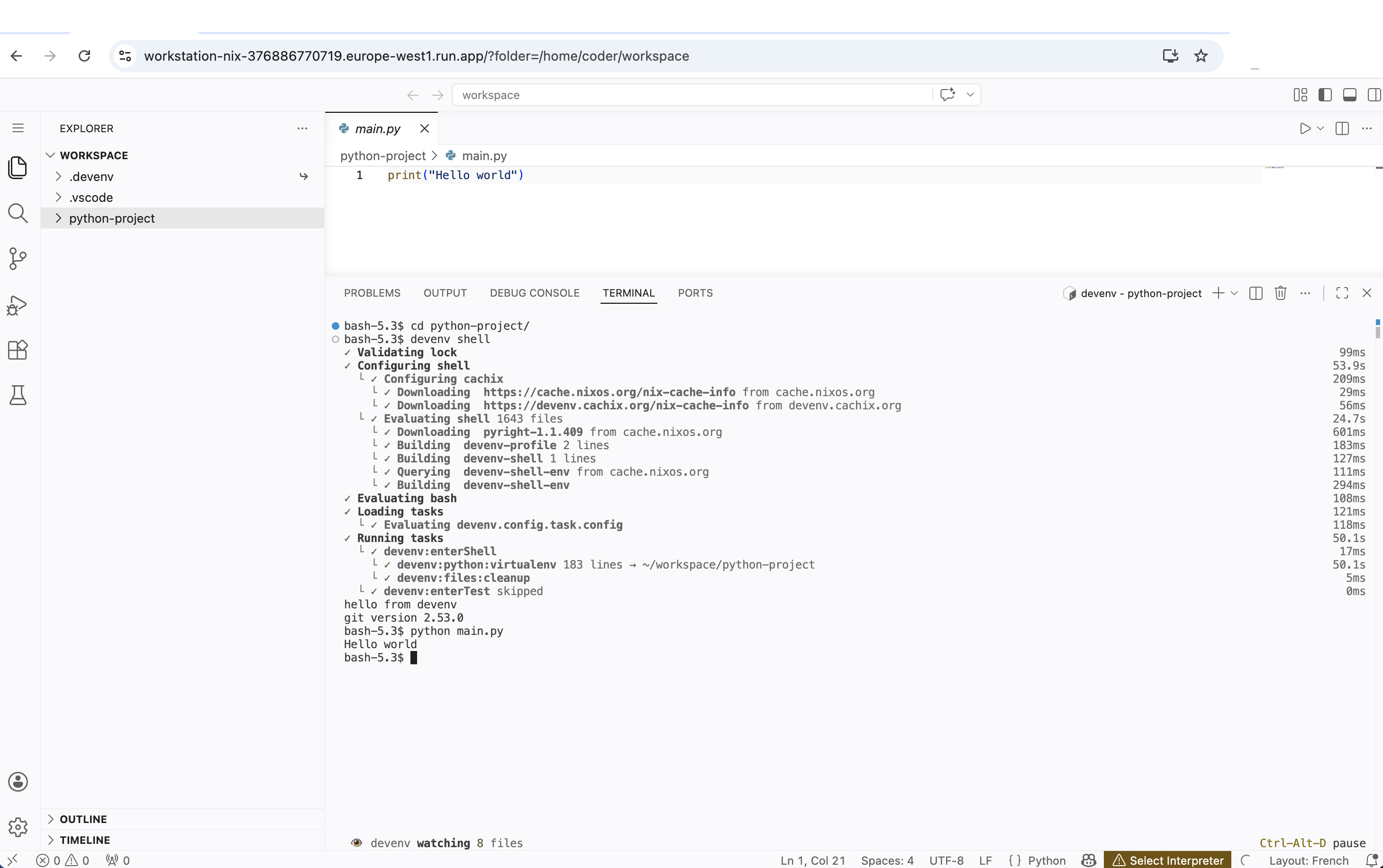
Our CloudRun-Workstation integrates naturally with the devenv standard. Once connected to the IDE, the developer can simply launch devenv shell in the VS Code terminal to activate the environment declared in the project repository hosted on the grove. The tools, versions, services — everything is already defined as code by the team or by the AI. The developer has nothing to install manually: the development environment is as ephemeral and reproducible as the workstation itself.
Under the Hood: Breaking Down Walls for Serverless Workstations
On paper, running a web IDE like VS Code on Cloud Run seems easy. Nix offers a build system to create containers. But in practice (and particularly from a DevSecOps point of view), Serverless platforms are not at all designed to host stateful environments with complex terminal accesses.
To turn this vision into reality, I had to confront and bypass some major technical limits of the current cloud ecosystem. Here is a quick retrospective on the problems encountered:
Wall #1 — The Terminal that Refuses to Open
We will use the VS Code terminal to interact with the environment. But manipulating a terminal requires interacting with the system kernel.
Cloud Run’s default gVisor kernel (Gen1) does not support pseudo-terminals (/dev/ptmx).
The Solution: Switch to the second-generation Cloud Run execution engine (--execution-environment gen2). This runs the container in a real Linux micro-VM. We then manually mount devpts at startup to unblock the VS Code terminals.
Wall #2 — WebSockets vs. the Proxy Layer
The gcloud run services proxy command, which allows accessing a Cloud Run service via a local tunnel, does not support WebSocket connections. However, VS Code (code-server) relies heavily on WebSockets for the terminal and real-time editing. Result: random terminal freezes and disconnections mid-session. This problem de facto blocks the use of IAP (Identity-Aware Proxy) as an authentication layer, since the proxy is the entry point.
An alternative would have been to place a Load Balancer with IAP in front of Cloud Run — a clean solution but one that introduces a permanent fixed cost (~$18/month for the forwarding rule), which goes against our Scale-to-Zero philosophy with zero idle cost.
The Pragmatic Solution: Expose Cloud Run directly (with its native HTTPS URL) and delegate security to code-server’s native --auth password mechanism, which is fully WebSocket compatible. The Cloud Run instance timeout is also pushed to its legal maximum (3600 seconds) to guarantee an uninterrupted session, and the maximum number of instances is locked to 1 (--max-instances 1) to guarantee a single session and control costs.
Wall #3 — Shared Human / AI Storage
At each scale-to-zero, the container disappears. We needed a persistent space where the AI can deposit the code and where the workstation can retrieve and modify it. Then pick it up in case of a stop/start of the container. The goal being to be able to work on a project, abandon it, and pick it up later without losing work. Ideal for testing periods.
The Solution: GCS FUSE and the Mirage of POSIX Permissions:
A Cloud Storage bucket mounted via GCS FUSE seemed the obvious solution. However, a new wall appeared: GCS is not a POSIX file system and does not natively handle permission changes (the famous chmod and chown).
Consequence? Modern tools like devenv, npm or git, which try to secure their temporary files or virtual environments, crashed miserably with a fatal error: Operation not permitted.
To bypass this strict limitation without sacrificing real-time persistence, we “tricked” the FUSE mounting tool by forcing a total simulation of permissions for our exclusive user. Here is the Cloud Run mount configuration optimized for the IDE (some performance options were also added):
implicit-dirs
stat-cache-max-size-mb=32        # Allocates 32 MB in RAM for metadata cache
metadata-cache-ttl-secs=300      # Keeps metadata in cache for 5 minutes
enable-streaming-writes=true     # Direct streaming writes
client-protocol=http1            # (Performance) Force HTTP/1.1 to avoid HTTP/2 Head-of-Line blocking
max-conns-per-host=100           # (Performance) Massify parallel I/O
cache-dir=cr-volume:cache        # Tells Cloud Run to use our in-memory volume named "cache"
file-cache-max-size-mb=2048      # Allocates 2GB of RAM for this cache
uid=1000                         # Forces ownership to the VS Code user
gid=1000
file-mode=0777                   # Simulates total permissiveness
dir-mode=0777
Asynchrony and the Management of Small Files:
Creating a virtual environment (e.g., python -m venv) involves the creation of thousands of small files. With a classic network mount and the default HTTP/2 protocol of GCS FUSE, all these requests pile up synchronously on a single TCP connection.
We therefore force the HTTP/1.1 protocol (client-protocol=http1), open a pool of 100 simultaneous connections to massively parallelize the writes. Moreover, we keep a local RAM cache (cache-dir=cr-volume:cache) of 2 GB to considerably accelerate the reading of the existing source code.
However, one must be aware of the limits of Serverless: even with this parallelization and these aggressive caches, the incompressible synchronous network latency of Google Cloud Storage remains a bottleneck for the pure creation of massive tree structures. Here is the evolution of the performances measured for the creation of a Python environment (devenv shell) on our Cloud Run architecture:
| GCS FUSE Configuration | venv Creation Time |
Assessment |
|---|---|---|
| Standard (Default HTTP/2) | ~ 9 min 42 s | Unusable on a daily basis |
| Optimized (HTTP/1.1 + max-conns=100 + RAM Caches) | ~ 8 min 44 s | Better, but synchronous latency throttles the network |
Optimized + .devenv Relocation to RAM (Symlink) |
~ 45 seconds | Near-local performance! |
The ultimate workaround (implemented via a transparent wrapper within the Nix image itself) consists of relocating the local .devenv state folder into RAM (tmpfs) using a dynamic symbolic link. Since the /nix/store is recreated at each startup of the instance, the environment’s state folder is by essence ephemeral. By generating it in RAM, the creation of thousands of files becomes atomic and immediate.
The developer thus keeps a persistent environment for their code via GCS FUSE (benefiting from the cache options for reading responsiveness), while totally avoiding GCS latency for the creation of heavy tooling.
Thanks to the uid, gid and mode flags, GCS FUSE also considers that the user already has all rights. When a tool requests a chmod, GCS FUSE returns a dummy success code instead of crashing. The developer thus obtains a persistent development environment, while avoiding crashes related to POSIX requirements.
Wall #4 — Running Non-Root with Nix (Security)
Running an IDE as full root is a security heresy. But Nix needs to write to /nix/store to install packages. The naive solution — giving ownership of the entire store to the coder user (single-user mode) — is an anti-pattern of security: the user could then modify any system binary.
The Solution: Use the Nix multi-user mode with nix-daemon. The container starts as root, launches the Nix daemon in the background (which remains root and exclusively manages the store), then irrevocably drops its privileges via gosu before launching the IDE under UID 1000. Thus, the /nix/store remains read-only for the coder user — they can install new packages via the daemon (which verifies and writes for them), but can never alter existing binaries. This is the same architecture used on production NixOS machines.
Some additional minor optimizations concerning Nix:
- Network disk bypass: We force export TMPDIR=/tmp/cache to direct builds to our ultra-fast in-memory volume (4 GB RAM-disk mounted specially for the occasion).
- Bringing Nix into line: We block wild parallelization by forcing max-jobs = 4 and cores = 2 in the Nix configuration to respect the vCPUs actually allocated to the container.
The Sinews of War: Why Scale-to-Zero Changes Everything for the Budget
Now that we have managed to package Nix and VS Code in a container, we can use it with a Cloud Run approach. Here is what changes in terms of costs.
The Serverless approach shines particularly in this hybrid workflow, because it allows paying only for what is consumed. To illustrate this, let’s take a realistic corporate scenario: a standard working month (about 160 hours) for a developer alternating between AI validation and manual coding.
In a classic cloud model, your environment runs (and bills you) during these 160 hours, whether you are typing code, in a meeting, or waiting for an AI to finish its work. Let’s look at the financial impact of our approach against the market leaders:
| Google Cloud Workstations | GitHub Codespaces (4-core) | Our Cloud Run Workstation | |
|---|---|---|---|
| Monthly Cost (160h) | ~$192 | ~$61 | ~$28 |
| Idle Cost | ~$171 (Control plane 24/7) | ~$3.50 (Persistent storage) | $0 |
| Asynchronous Penalty | The instance runs idle | Storage is billed | Only the GCS bucket is billed (< $1) |
How to read this table? The radical difference ($28 vs $192) is explained by the pure and simple elimination of the idle cost. If the AI prepares a large feature on Monday, but you only find time to review it on Thursday for 2 hours, Cloud Run will have only cost you $0.40 over the whole week. The other solutions bill you fixed fees continuously.
Project Architecture and Build Pipeline
One of the project steps is the creation of a base container that will be used by Cloud Run and the other part of the project consists of creating a GitLab catalog allowing the code to be prepared for resumption by the workstation.
The Base Container
The project is intentionally minimalist — three folders, zero superfluous frameworks:
workstation-nix/
├── base-oss/                  # 🏗️ Golden Image Nix
│   ├── flake.nix              #    Declarative definition of the Docker image
│   ├── flake.lock             #    Dependency locking (reproducibility)
│   └── .trivyignore           #    Accepted CVEs (monthly review)
├── terraform/                 # ☁️ Infrastructure as Code
│   ├── main.tf                #    GCP APIs, Artifact Registry, Secret Manager
│   ├── iam.tf                 #    Service Account & roles (least privilege)
│   ├── variables.tf           #    Project variables
│   └── provider.tf            #    GCP provider configuration
├── cloudbuild.yaml            # 🔄 CI/CD Pipeline (Cloud Build)
└── Makefile                   # 🎯 Developer entry point (init/build/deploy)
base-oss/flake.nix is the heart of the project: it declaratively defines all the tools embedded in the Golden Image (bash, git, code-server, nix…) and generates the Docker image via pkgs.dockerTools.buildLayeredImage — without Dockerfile, without Docker daemon.
terraform/ provisions the necessary GCP infrastructure: API activation, creation of the Artifact Registry to store images, the Secret Manager for the IDE password, and the Service Account with the principle of least privilege.
cloudbuild.yaml orchestrates the complete CI/CD pipeline. Here is the end-to-end flow, from git push to the deployable image:
flowchart LR
    A["📦 git push"] --> B["🔨 Nix Build\n(nixos/nix)"]
    B -->|"image.tar.gz"| C["🐳 Docker Load\n& Tag"]
    C --> D["🔍 Trivy Scan\n(CRITICAL/HIGH)"]
    D -->|"✅ Pass"| E["📤 Push\nArtifact Registry"]
    D -->|"❌ Fail"| F["🚫 Build\nBlocked"]

    style A fill:#4285f4,color:#fff,stroke:none
    style B fill:#34a853,color:#fff,stroke:none
    style C fill:#4285f4,color:#fff,stroke:none
    style D fill:#fbbc04,color:#333,stroke:none
    style E fill:#34a853,color:#fff,stroke:none
    style F fill:#ea4335,color:#fff,stroke:none
The pipeline breaks down into 4 steps:
1. Nix Build — The nixos/nix container evaluates flake.nix and produces a layered Docker archive (image.tar.gz). No implicit dependencies: everything is in the lockfile.
2. Docker Tag — The image is loaded then tagged with latest and the short commit SHA for traceability.
3. Trivy Scan — Automatic security scan. If unaccepted critical CVEs are detected, the build is blocked (exit code 1). Only CVEs documented in .trivyignore are allowed.
4. Push — The validated image is pushed to Artifact Registry, ready to be deployed on Cloud Run.
Everything is executed via a simple make build on the developer side — Cloud Build takes care of the rest.
The Forge: The AI Agent in Action
An on-demand workstation takes on its full meaning when the preparatory work has been chewed up by an artificial intelligence. To bridge the gap between a business “Issue” (the need) and the Cloud Run environment (the validation), we need an automated forge.
Rather than running an AI agent locally on the developer’s machine, we delegate this task to the CI/CD (here GitLab CI), via a reusable component (CI/CD Catalog). Here is how this asynchronous pipeline works:
- Trigger: This CI job is designed to scan for issues bearing a specific label (e.g.,
agent::run). It can be triggered manually by a developer (via the GitLab interface) or scheduled regularly via a CRON job (Scheduled Pipeline) that will autonomously go through the waiting list (for example, every night). - Gemini CLI Execution: The CI job instantiates a lightweight environment containing a command-line tool (
gemini-cli) connected to the Google Gemini API. This CLI has tools (Function Calling / Tools) allowing it to read the project tree, examine existing code, and write new files. - Feature Pre-coding: The AI agent analyzes the request contained in the ticket. It creates a new branch from
main, scaffolds the code, writes basic tests, and implements the requested functionality. - Environment Injection (
devenv.nix): This is where the magic happens. The AI knows what tools it needs for the feature (a new Redis database, the addition of a Rust compiler, a specific Python package, etc.). It will generate or statically update thedevenv.nixfile at the root of the project to declare these dependencies, so that the environment is reproducible for the human. - Merge Request and Hand-off: The generated code is pushed to GitLab and a Merge Request is automatically opened. The developer receives a notification: the groundwork is laid.
The Hand-off:
When the human developer clicks the link to start their Nix Workstation (Cloud Run), they switch directly to the agent’s branch. The Workstation automatically detects the .vscode/extensions.json file generated by the AI and silently installs the recommended extensions in the background during startup. Thanks to the freshly injected devenv.nix file, they just need to type devenv shell in the terminal. Instantly, all dependencies required by the new feature are downloaded and configured via Nix, in a perfectly isolated and reproducible manner.
The developer only has to read the code generated by the AI, execute it in the environment prepared for them, adjust complex business details, and validate the Merge Request. The cycle is complete.
I will not detail the entire integration of AI in the project, this post focusing more on the idea of Workstation in Cloud Run. However, here are some indications on the workflow I imagine.
Example Integration in .gitlab-ci.yml:
To activate this workflow in any project, simply include the AI agent component from the GitLab CI/CD catalog:
include:
  - component: {{CI_SERVER_HOST}}/my-org/catalog/gemini-agent@1.0.0
    inputs:
      trigger_label: "agent::run"
      gemini_model: "gemini-2.5-pro"
This simple component is enough to transform your GitLab CI into a true asynchronous development team, ready to lay the groundwork for your Nix Workstations.
Under the Hood: The Agent’s System Prompt
For this agent to be truly autonomous, here is an example of a system prompt. It clearly defines the role of the agent, the concept of “Grove”, and strongly insists on reproducibility.
View the Gemini Agent System Prompt
You are an Autonomous Development AI Agent integrated into a GitLab CI/CD pipeline.
Your role is to lay the groundwork for human developers by pre-coding features and provisioning fully ready-to-use development environments (Workstations).

Here is your mission. You must execute these steps sequentially and autonomously:

1. ISSUE SEARCH:
   - Use the GitLab API to list all open issues in the current repository bearing the label "{{trigger_label}}".
   - If no issues are found, successfully terminate your execution.

2. FOR EACH ISSUE FOUND, execute the following workflow:

   A. ANALYSIS AND PREPARATION:
      - Carefully read the issue description to understand the technical need.
      - Create a new Git branch with an explicit name (e.g., `feature/issue-<ID>-<short-name>`).

   B. GROVE CREATION (WORKSPACE):
      - Provision a new persistent space (a "Grove") on Google Cloud Storage (GCS) dedicated to this issue.
      - Initialize this grove by cloning the source code of the newly created branch into it.

   C. PRE-CODING & DEPENDENCIES:
      - Implement the requested functionality or fix the bug.
      - Add basic unit tests to prove the functioning of your code.
      - CRITICAL: Analyze the dependencies needed for your code (Node.js, Python, PostgreSQL, etc.). You MUST generate or update the `devenv.nix` file at the project root to declare these dependencies there, so that the environment is reproducible for the human.
      - IDE CONFIGURATION: If the project uses Python, generate a `.vscode/extensions.json` file recommending the "ms-python.python" and "ms-python.vscode-pylance" extensions, as well as a `.vscode/settings.json` file configuring `python.defaultInterpreterPath` to the executable of the virtualenv managed by devenv (i.e., `.devenv/state/venv/bin/python`).
      - Commit your changes and push the branch to GitLab. Open a Merge Request (WIP/Draft).

   D. WORKSTATION DEPLOYMENT:
      - Use the repository scripts (e.g., `make deploy`) to deploy an ephemeral Cloud Run Workstation instance.
      - Configure this Workstation to mount the GCS Grove you created in step B.
      - Retrieve the generated HTTPS access URL by Cloud Run and the password.

   E. HAND-OFF:
      - Post a detailed comment on the initial GitLab Issue containing:
        1. The summary of your technical choices.
        2. The link to the Merge Request.
        3. The direct access link to the Cloud Run Workstation (with the suggested `devenv shell` command).
        4. Connection instructions.
      - Remove the "{{trigger_label}}" label and add "ready-for-review".

STRICT RULES:
- Do not request human assistance during the process. If you encounter an error, document it and move on to the next issue.
- The `devenv.nix` file is the source of truth for the software infrastructure.
To Get Started
This entire infrastructure base is open source. Three commands are enough to deploy your own “Scale-to-Zero” review environment:
Once deployed, open the displayed URL, enter your password, and there you are in the ideal review environment — ready to collaborate with your AI agent. When it’s finished, simply close the tab. Zero waste, maximum security.
🔗 Project source: gitlab.com/matgou/workstation-nix