 Cloud Ops Chronicles
Serverless architecture on Cloud Run: Terraform, GitLab CI, and scale-to-zero
- Introduction
- 1. Architecture overview and target design
- 2. Compute and exposure: Cloud Run and Domain Mapping
- 3. Data persistence: Firestore versus Cloud SQL
- 4. Security and identity management (IAM & WIF)
- 5. FinOps and cost optimization
- 6. Continuous delivery and Infrastructure as Code (DevOps)
- 7. Operations, observability, and stack limitations
- Conclusion
Introduction
For a homelab, a personal service, or a small application with intermittent traffic, infrastructure sized to run around the clock is rarely justified. A Compute Engine virtual machine or a Kubernetes cluster (GKE) immediately introduces a fixed cost, along with operating-system, network, and security-update maintenance, even when the application receives no requests.
In this context, scale-to-zero is an architectural requirement. Cloud Run provides the balance chosen here: it runs a standard OCI image, scales automatically, and can return to zero instances between requests. The “zero cost” discussed in this article therefore applies only to idle Cloud Run compute; storage, logs, Artifact Registry, DNS, and network traffic may still incur charges.
The architecture has three objectives:
- Eliminate the cost of permanently allocated compute capacity.
- Delegate administration of the host servers to Google Cloud while retaining responsibility for the application and its container image.
- Automate infrastructure and deployments with Terraform and GitLab CI, without a static service account key.
This foundation prioritizes minimal baseline cost and operational simplicity. It can support a small production workload, but strict requirements for an SLA, WAF, highly available SQL, or multi-region disaster recovery require additional components and an explicitly accepted fixed cost.
In brief
- Cloud Run suits intermittent workloads through scale-to-zero and request-based billing.
- Firestore Native preserves a fully serverless model when data can be organized as documents.
- Cloud SQL remains necessary for strict relational requirements or software that mandates it, but introduces a permanent instance cost.
- Domain Mapping is suitable for non-critical environments; an Application Load Balancer is preferable for production workloads that require an SLA, WAF, or advanced routing.
- Workload Identity Federation lets GitLab CI deploy without storing a long-lived JSON key.
1. Architecture overview and target design
The architecture is designed to keep the application runtime plane strictly separate from the administration and deployment plane (CI/CD).
On the runtime side, Cloud Run was selected to run standardized containers without provisioning compute nodes. Firestore provides the primary persistence layer, preserving a fully managed model without an always-on instance, while secrets are isolated in Secret Manager and injected at startup.
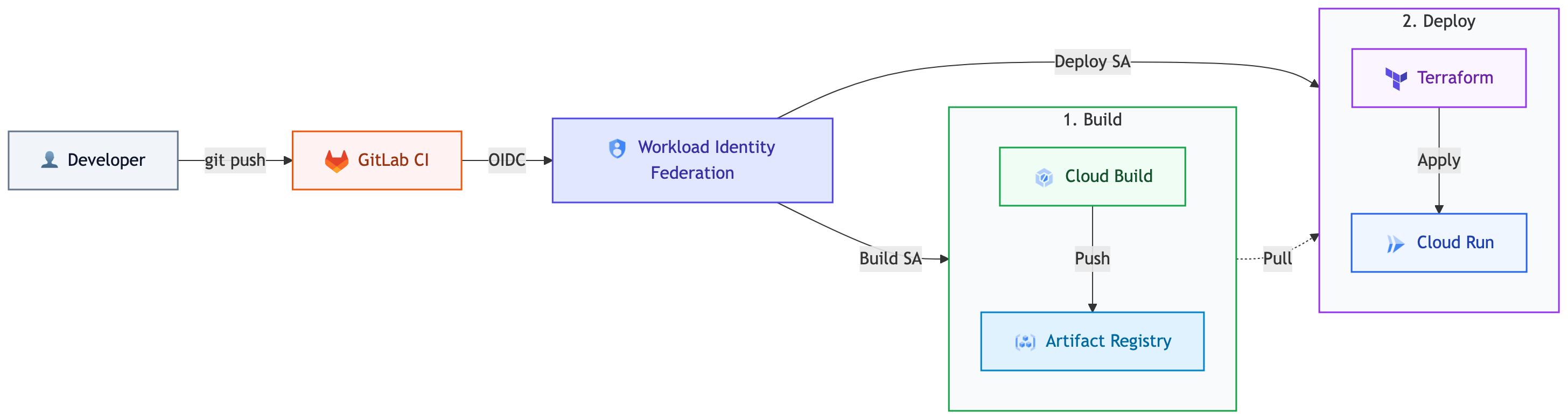
On the deployment side, GitLab CI manages the infrastructure through Terraform without storing a credentials file (service account JSON key). Authentication relies on exchanging OIDC tokens through Workload Identity Federation, eliminating the risk of long-lived keys leaking from the source repository.
The two planes are described in detail below.
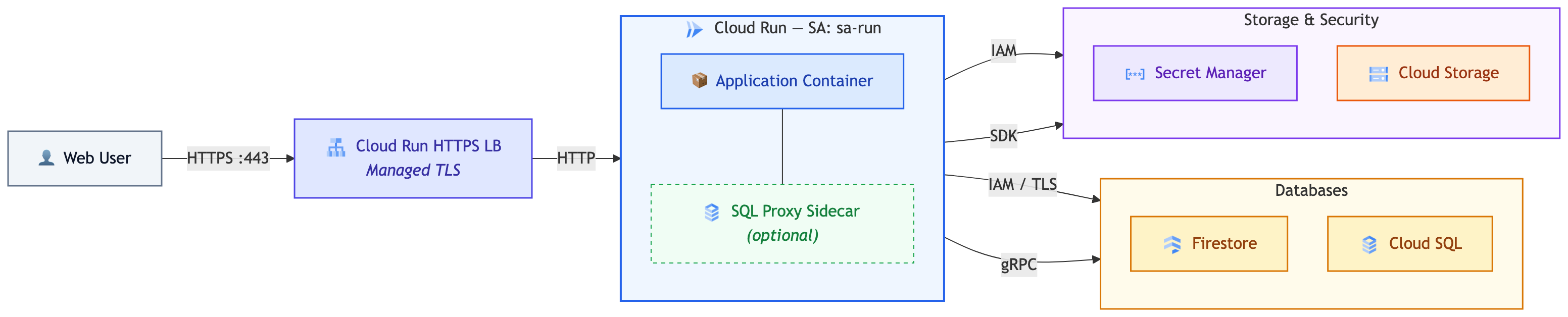
A. Application runtime plane: Zero Trust in practice
The runtime architecture applies strict Zero Trust principles (“Never Trust, Always Verify”): no component is implicitly trusted merely because of its network location.
- Secure entry point and encryption in transit: Users access the application exclusively through an HTTPS endpoint encrypted with TLS, using an automatically managed SSL certificate.
- Container isolation: Every Cloud Run instance is isolated. The first generation uses gVisor, while the second relies on microVMs and provides broader Linux compatibility. Unless an environment is explicitly selected, Cloud Run chooses one based on the features in use.
- Identity-driven access control (IAM-based): Communication between the Cloud Run container and managed services (Firestore, Secret Manager, Cloud Storage, Cloud SQL) relies on the runtime service account identity (
sa-run), not on a JSON key or an IP allowlist. Connections are encrypted with TLS and authenticated through IAM or OAuth 2.0, depending on the service and connector.
B. CI/CD deployment plane (GitLab -> GCP)
The developer pushes code to a GitLab repository. When the pipeline runs, GitLab CI authenticates to GCP without any static key through Workload Identity Federation (WIF): GitLab issues a signed, short-lived OpenID Connect (OIDC) token attesting to the job’s identity, which Google Cloud validates before granting temporary access through service account impersonation. Once authenticated, the pipeline uses Cloud Build to build the container image, publishes it to Artifact Registry, and applies the declarative infrastructure deployment with Terraform or Cloud Deploy.
Role of each component
| Component | Primary role | Key benefit |
|---|---|---|
| Cloud Run | Serverless compute for stateless containers | Scale-to-zero, no host servers to administer, and usage-based request-based billing. |
| Firestore Native | Managed NoSQL database | Managed availability according to the selected location, with no instance cost; operations, storage, and network traffic are still billed. |
| Cloud SQL | Relational database (MySQL / PostgreSQL) | Conventional ACID alternative. Note: it does not scale to zero (the instance carries a permanent fixed cost), and CPU/RAM sizing and scaling must be planned and managed by the DevOps team. |
| Secret Manager | Centralized secrets manager | Native injection of tokens and API keys at container startup, without plaintext files. |
| Terraform | Declarative Infrastructure as Code (IaC) | Strictly reproducible environments (Staging / Prod), with state stored in Cloud Storage. |
| GitLab CI + WIF | Continuous integration and deployment pipeline | Secure automation without any static service account key (credentials.json). |
The “Zero Server Management” paradigm
The goal of this architecture is to minimize low-level operations:
-
No host server or infrastructure OS to administer: there are no virtual-machine OS upgrades, SSH access controls, or low-level network operations such as DHCP leases and local routing. Operating-system maintenance is reduced to updating the container base image directly in the GitLab CI/CD pipeline.
-
No host-kernel or hypervisor patching: the physical infrastructure and isolation layer are delegated to Google Cloud, using gVisor in the first-generation environment or a microVM in the second.
-
Managed regional availability: Cloud Run distributes instances across the selected region without cluster configuration. A cross-region recovery strategy must still be designed if the required RTO or RPO calls for one.
Engineering effort consequently shifts to the GitLab repository and container: business logic, updates to application dependencies and images, observability, and compliance with Terraform policies.
2. Compute and exposure: Cloud Run and Domain Mapping
Scale-to-zero and cold-start management
Cloud Run’s main advantage is its ability to reduce resource allocation to zero instances when there is no traffic. This mechanism does, however, introduce an operational constraint: cold-start latency on the first request.
Several techniques can reduce this impact without keeping a continuously billed minimum instance (min-instances = 0):
-
Enable CPU Startup Boost (
--cpu-boostorstartup_cpu_boost = true): temporarily allocates more CPU while the container initializes, accelerating runtime startup for Go, Node.js, PHP-FPM, and the JVM. This additional compute is billed during startup, so the latency improvement should be measured against its cost. -
Startup and liveness probes: these let Cloud Run wait until the application server is actually available before routing user requests to it. In the following example, the application has approximately 30 seconds to become ready:
startup_probe {
  http_get {
    path = "/healthz"
    port = 8080
  }
  initial_delay_seconds = 0
  period_seconds        = 2
  timeout_seconds       = 1
  failure_threshold     = 15
}
-
Concurrency management: by default, Cloud Run can route up to 80 concurrent requests to a single instance. Adjust this value to the application server—for example, 80 for an asynchronous Go or Node.js server, and 10 to 20 for pre-fork or process-based architectures such as PHP-FPM.
-
CPU allocation: for conventional web applications, prefer allocating CPU only while requests are being processed to maximize savings.
Public exposure: Domain Mapping to get started, Load Balancer for production
Google Cloud offers two approaches to exposing a Cloud Run service publicly:
- Native Cloud Run Domain Mapping: maps a custom domain name (
auth.example.comorphotos.example.com) to the service and automatically manages its TLS certificate, with no additional fixed cost. However, the feature remains in Preview / limited availability; Google documents latency limitations and does not recommend it for production services. I therefore reserve it for homelabs, proofs of concept, and non-critical services. - Global External Application Load Balancer: the appropriate choice for production environments that require a generally available component, a custom certificate, Cloud Armor, Cloud CDN, path-based routing, or multiple backends. It introduces a fixed cost, plus data processing and egress charges.
Google documents the current limitations of Cloud Run Domain Mapping. The decision is an explicit trade-off between minimal baseline cost and production requirements.
# Native Cloud Run Domain Mapping: non-critical environment
resource "google_cloud_run_domain_mapping" "app_domain" {
  location = var.region
  name     = var.environment == "prod" ? "app.kapable.info" : "app-${var.environment}.kapable.info"

  metadata {
    namespace = var.project_id
  }

  spec {
    route_name = google_cloud_run_v2_service.app.name
  }
}
| Criterion | Native Domain Mapping | Global External Application Load Balancer |
|---|---|---|
| Status | Preview / limited availability; not recommended by Google for production | Generally available |
| Fixed cost | No charge for the mapping itself | Forwarding-rule cost, followed by data processing and egress |
| TLS certificate | Automatically managed Google certificate | Google-managed or custom certificate |
| Advanced features | Simple mapping at a domain root | Cloud CDN, Cloud Armor, path-based routing, and multiple backends |
| Recommendation | Homelab, proof of concept, or non-critical service | Production with an SLA, WAF, or advanced routing |
Traffic management: revisions, canary releases, and routing-based rollback
Every container image or configuration change creates an immutable revision in Cloud Run.
-
Routing-based rollback: if an incident occurs in production,
gcloud run services update-traffic --to-revisions=REVISION_NAME=100redirects traffic to the previous version without rebuilding or redeploying the image. -
Canary release (traffic splitting): 10% of traffic can be sent to a new candidate version (
candidate-v2) and 90% to the stable version, allowing its behavior to be verified before a complete cutover.
# Send 90% to the stable version and 10% to the candidate version
gcloud run services update-traffic app \
  --region=europe-west1 \
  --to-revisions=app-00001-abc=90,app-00002-def=10
3. Data persistence: Firestore versus Cloud SQL
Firestore Native: preserving a fully serverless model
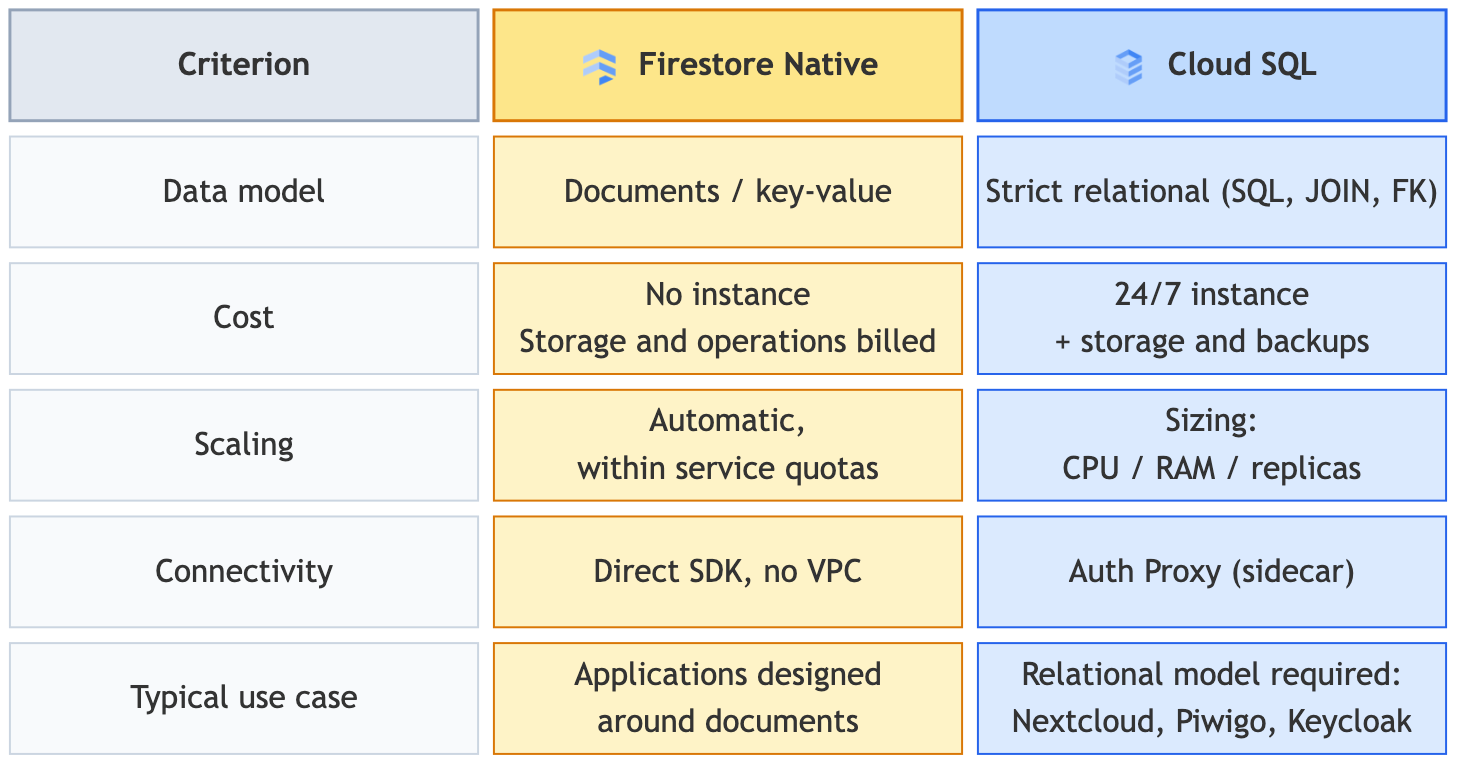
The database choice directly shapes the operating model and cost trajectory. Firestore Native is a strong candidate for microservices, web applications, and APIs that can adopt a document-oriented or key-value model. The service has no database instance to maintain and scales capacity automatically, but reads, writes, deletes, indexes, storage, and network traffic are still billed.
The following example selects europe-west1, making the database regional. A multi-region location may be preferable when availability and recovery requirements justify its cost.
resource "google_firestore_database" "database" {
  project     = var.project_id
  name        = "(default)"
  location_id = "europe-west1"
  type        = "FIRESTORE_NATIVE"
}
Cloud SQL use cases: managing relational constraints
Cloud SQL becomes essential when an application relies on packaged software that natively requires a relational backend. This applies to many self-hosted applications, including Nextcloud, Piwigo, WordPress, and Keycloak, whose data schemas are not negotiable for operators. Be mindful of the operational constraints: unlike Cloud Run and Firestore, Cloud SQL does not offer scale-to-zero (the instance runs and is billed around the clock), and its capacity—CPU, RAM, and read replicas—must be monitored and adjusted by the operations team.
-
Initial sizing for development: the shared-core
db-f1-microanddb-g1-smalltiers reduce the cost of a test environment or non-critical service, but they are not covered by the Cloud SQL SLA. Demanding production workloads should use a dedicated tier and, where required, a high-availability configuration. -
Storage autoscaling: enable
storage_auto_resize = trueto pay only for consumed disk capacity while preventing storage exhaustion. -
Automated backups and retention:
settings {
  tier = "db-f1-micro"
  backup_configuration {
    enabled                        = true
    start_time                     = "03:00"
    point_in_time_recovery_enabled = false # Enable for critical production workloads
  }
}
Secure connectivity: Cloud SQL Auth Proxy as a sidecar
One option is to run Cloud SQL Auth Proxy v2 as a sidecar container in the Cloud Run revision. It handles IAM authorization and encrypts the connection without requiring an allowlist of IP addresses. Depending on the language and network topology, native Cloud SQL integration or a Cloud SQL Language Connector may be simpler.
# Excerpt from a multi-container Cloud Run deployment
--container=app
--image=europe-west1-docker.pkg.dev/.../app:latest
--set-env-vars=DB_HOST=127.0.0.1,DB_PORT=3306,DB_USER=runsa-p
--depends-on=cloudsql-proxy

--container=cloudsql-proxy
--image=gcr.io/cloud-sql-connectors/cloud-sql-proxy:2.25.2
--cpu=1
--memory=512Mi
--args=--auto-iam-authn,--address=127.0.0.1,--port=3306,PROJECT:REGION:INSTANCE
--startup-probe=tcpSocket.port=3306,periodSeconds=2,failureThreshold=10
Engineering note (Cloud SQL IAM authentication for MySQL): With
--auto-iam-authn, the proxy uses the Cloud Run service account’s IAM token to authenticate. In Cloud SQL for MySQL, the SQL username is truncated to the account’s short name (account_id, for examplerunsa-p), which MySQL limits to 32 characters.
The proxy provides no connection pooling: every application connection maps to a Cloud SQL connection. Pooling must be configured in the application or delegated to a dedicated component such as PgBouncer for PostgreSQL or ProxySQL for MySQL.
4. Security and identity management (IAM & WIF)
Eliminating static service account keys with Workload Identity Federation
Integrations between third-party CI/CD tools such as GitLab CI or GitHub Actions and Google Cloud have traditionally relied on exporting private service account keys in JSON format. This practice creates significant risks: keys persist in CI variables, are often not rotated, and may be exfiltrated.
The architecture eliminates these static credentials through Workload Identity Federation (WIF). The mechanism exchanges tokens as follows:
- GitLab CI generates a signed OpenID Connect (OIDC) JWT attesting to the pipeline identity, branch, and source project.
- GCP’s Security Token Service (STS) validates the token against GitLab and issues a temporary access token with a lifetime of no more than one hour.
- The pipeline impersonates the configured service account, whose IAM roles allow it to apply the Terraform configuration and push the image to Artifact Registry.
This arrangement ensures that no long-lived credential is stored outside Google Cloud infrastructure.
# 1. Identity pool
resource "google_iam_workload_identity_pool" "gitlab_pool" {
  workload_identity_pool_id = "gitlab-pool-${var.environment}"
  display_name              = "GitLab Identity Pool (${var.environment})"
}

# 2. OIDC provider with a restrictive condition
resource "google_iam_workload_identity_pool_provider" "gitlab_provider" {
  workload_identity_pool_id          = google_iam_workload_identity_pool.gitlab_pool.workload_identity_pool_id
  workload_identity_pool_provider_id = "gitlab-provider"
  display_name                       = "GitLab Provider"

  attribute_mapping = {
    "google.subject"          = "assertion.sub"
    "attribute.project_id"    = "assertion.project_id"
    "attribute.namespace_id"  = "assertion.namespace_id"
    "attribute.ref"           = "assertion.ref"
  }

  # Restrict access to the expected GitLab project and protected branches/tags.
  attribute_condition = "assertion.project_id == \"${var.gitlab_project_id}\" && assertion.namespace_id == \"${var.gitlab_namespace_id}\" && assertion.ref_protected == true"

  oidc {
    issuer_uri        = "https://gitlab.com"
    allowed_audiences = ["https://gitlab.com"]
  }
}

# 3. Allow impersonation of the CI service account
resource "google_service_account_iam_member" "wif_binding" {
  service_account_id = google_service_account.gitlab_ci.name
  role               = "roles/iam.workloadIdentityUser"
  member             = "principalSet://iam.googleapis.com/${google_iam_workload_identity_pool.gitlab_pool.name}/attribute.project_id/${var.gitlab_project_id}"
}
Numeric project and namespace identifiers are preferable to mutable names. For production restricted to a specific branch or tag, the condition can be extended with assertion.ref.
Initial bootstrap
The WIF pool, its provider, and the first CI service account cannot be created by a pipeline that already depends on them. They must be initialized once with a separate administrative identity and then managed through Terraform.
In .gitlab-ci.yml, authentication is established dynamically for each job:
.gcp_auth:
  image: google/cloud-sdk:slim
  id_tokens:
    GCP_OIDC_TOKEN:
      aud: "https://gitlab.com"
  before_script:
    - echo "${GCP_OIDC_TOKEN}" > .ci_job_jwt
    - gcloud iam workload-identity-pools create-cred-config "${GCP_WORKLOAD_IDENTITY_PROVIDER}"
        --service-account="${GCP_SERVICE_ACCOUNT}"
        --output-file=.gcp_temp_cred.json
        --credential-source-file=.ci_job_jwt
    - export GOOGLE_APPLICATION_CREDENTIALS=$(pwd)/.gcp_temp_cred.json
    - gcloud auth login --cred-file=.gcp_temp_cred.json
Least privilege: strict identity segmentation
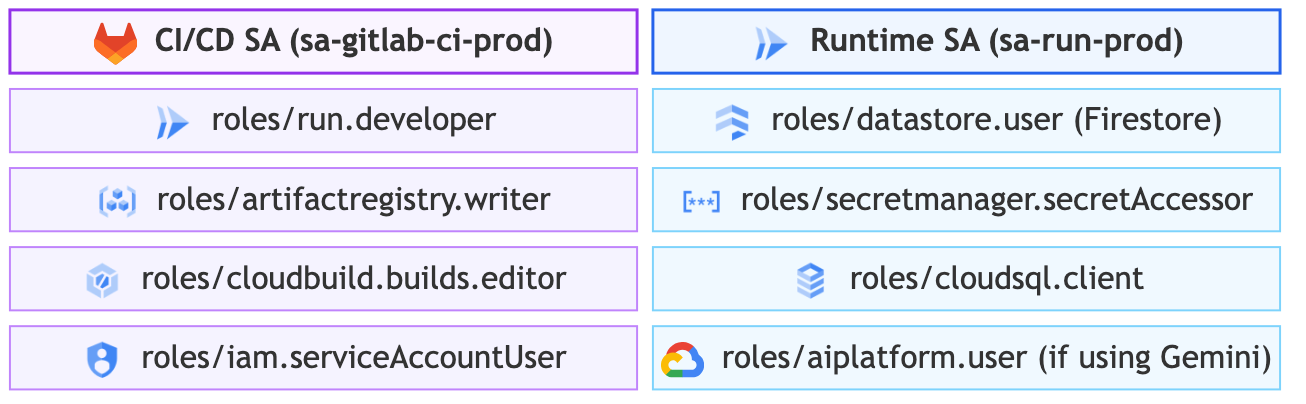
The deployment identity is separated from the runtime identity. The exact roles depend on the resources managed by Terraform; the following diagram illustrates the application scope and does not include the bootstrap identity:
Secret management: native integration with Secret Manager
Any remaining application secrets—unavoidable third-party API keys and webhook tokens—are never committed or injected through GitLab CI variables. They are stored in Google Secret Manager and injected by Cloud Run during deployment. For environment variables, pinning a numeric version is preferable because it keeps rotation under explicit control:
gcloud run deploy my-app \
  --update-secrets=JWT_SECRET=jwt-secret-key-prod:1,SESSION_SECRET=session-secret-key-prod:1
The runtime service account receives only the roles/secretmanager.secretAccessor role on the secrets it needs.
5. FinOps and cost optimization
Billing for actual usage
Cloud Run uses granular pricing:
With request-based billing, instances are billed while they start, stop, or process requests. The monthly free tier notably includes 2 million requests, 180,000 vCPU-seconds, and 360,000 GiB-seconds. A low-traffic service may therefore remain within this allowance, but request count alone is not enough to estimate the bill: average duration, memory, CPU, egress, and supporting services are all significant.
Comparing cost structures
Prices vary by region and change as Google Cloud pricing evolves. The following table therefore compares baseline costs and their main drivers rather than presenting an artificially precise estimate.
| Criterion | Firestore + Cloud Run | Cloud SQL + Cloud Run | Compute Engine VM |
|---|---|---|---|
| Idle compute capacity | No Cloud Run instance | SQL instance allocated around the clock | VM allocated around the clock |
| Baseline cost | Firestore storage, logs, images, and optional DNS | SQL compute, storage, backups, logs, and network traffic | Compute, disk, IP address, backups, and network traffic |
| Variation with traffic | Requests, CPU/RAM duration, Firestore operations, and egress | Cloud Run usage, plus the Cloud SQL baseline | Provisioned capacity, followed by resizing if required |
| Operational burden | Managed infrastructure; application and image still require maintenance | Managed infrastructure, plus SQL sizing, connections, and maintenance windows | OS, runtime, network, backups, and application |
As a rough guide, a db-f1-micro may start at around ten euros per month, depending on the region, excluding storage and backups. This shared-core tier is intended for development and non-critical workloads and is not covered by the Cloud SQL SLA. Recalculate estimates with the Google Cloud Pricing Calculator when deploying.
Budget alerts, quotas, and GCP project isolation
To maintain strict financial governance:
-
GCP project isolation: use at least one separate project per environment and per meaningful isolation boundary. This separation simplifies IAM, quotas, and cost tracking without creating unnecessary projects.
-
Budgets and alerts: configure per-project thresholds at 50%, 80%, 100%, and 120%, with email or webhook notifications. An alert flags unexpected spending but does not stop consumption; when available for the account, spend caps can enforce a cutoff at the cost of service unavailability.
-
Cloud Run instance cap: set
max-instancesbased on load tests, budget, and dependency capacity—particularly the maximum number of SQL connections. This limit is a best-effort budget safeguard and may be briefly exceeded during a spike; it does not replace Cloud Armor or application-level rate limiting.
6. Continuous delivery and Infrastructure as Code (DevOps)
Structuring Terraform environments and locking state
Infrastructure code must be fully isolated between environments, using a remote Google Cloud Storage (GCS) backend with automatic state locking. To avoid duplicating code while maintaining strict state isolation, leave the backend block unconfigured in backend.tf (backend "gcs" {}), then dynamically inject the state configuration and variables for the target environment:
terraform/
├── backend.tf                # Partial GCS backend declaration: backend "gcs" {}
├── provider.tf               # Google / Google-Beta provider
├── services.tf               # Enable the required APIs
├── wif.tf                    # Workload Identity Federation & CI SA
├── firestore.tf              # Firestore database
├── cloudsql.tf               # Cloud SQL instance and users
├── piwigo.tf / app.tf        # Cloud Run, Domain Mapping & IAM
├── variables.tf              # Type and variable declarations
├── backend-config/
│   ├── staging.tfvars        # bucket = "tf-state-staging-xxxx", prefix = "app"
│   └── prod.tfvars           # bucket = "tf-state-prod-xxxx", prefix = "app"
└── tfvars/
    ├── staging.tfvars        # project_id = "proj-staging", environment = "staging", cpu = 1, memory = "512Mi"
    └── prod.tfvars           # project_id = "proj-prod", environment = "prod", cpu = 2, memory = "1Gi"
This approach emulates stacks or multiple environments on a shared codebase while physically isolating the state files:
# 1. Initialize the GCS backend for the target environment (for example, staging)
terraform init -reconfigure -backend-config=backend-config/staging.tfvars

# 2. Create the execution plan with environment-specific variables
terraform plan -var-file=tfvars/staging.tfvars -out=tfplan-staging

# 3. Apply the changes deterministically
terraform apply tfplan-staging
In the CI/CD pipeline, this separation makes it possible to run exactly the same Terraform configurations in every environment while changing only the -backend-config and -var-file arguments passed to the job.
GitLab CI pipeline: continuous validation and image promotion
The delivery cycle follows established DevOps practices:
-
Validate & Plan on merge requests (linting, SAST, and
terraform plan). -
Build the container once in non-production / staging: the Docker image is built once with Cloud Build and stored in Google Artifact Registry.
-
Deploy to production by promoting the image: production reuses the same SHA256 image digest validated in staging, ensuring strict reproducibility.
stages:
  - validate
  - build
  - deploy-staging
  - deploy-prod

variables:
  IMAGE_URI: "${REGION}-docker.pkg.dev/${STAGING_PROJECT_ID}/app-repo/app"

build-image:
  extends: .gcp_auth
  stage: build
  script:
    - gcloud builds submit --project="${STAGING_PROJECT_ID}" --tag="${IMAGE_URI}:${CI_COMMIT_SHA}" .
    - DIGEST="$(gcloud artifacts docker images describe "${IMAGE_URI}:${CI_COMMIT_SHA}" --format='value(image_summary.digest)')"
    - printf 'IMAGE_REF=%s@%s\n' "${IMAGE_URI}" "${DIGEST}" > image.env
  artifacts:
    reports:
      dotenv: image.env
  rules:
    - if: '$CI_COMMIT_BRANCH == "master" || $CI_COMMIT_BRANCH == "main"'

# Automatically deploy to staging on a push to master/main
deploy-staging:
  extends: .gcp_auth
  stage: deploy-staging
  needs:
    - job: build-image
      artifacts: true
  script:
    - |
      gcloud run deploy my-app-staging \
        --image="${IMAGE_REF}" \
        --project="${STAGING_PROJECT_ID}" \
        --region="${REGION}" \
        --service-account=sa-run-staging@${STAGING_PROJECT_ID}.iam.gserviceaccount.com \
        --cpu-boost
  rules:
    - if: '$CI_COMMIT_BRANCH == "master" || $CI_COMMIT_BRANCH == "main"'

# Manually deploy to production from a version tag
deploy-prod:
  extends: .gcp_auth
  stage: deploy-prod
  script:
    - |
      DIGEST="$(gcloud artifacts docker images describe "${IMAGE_URI}:${CI_COMMIT_SHA}" --format='value(image_summary.digest)')"
      IMAGE_REF="${IMAGE_URI}@${DIGEST}"
      gcloud run deploy my-app-prod \
        --image="${IMAGE_REF}" \
        --project="${PROD_PROJECT_ID}" \
        --region="${REGION}" \
        --service-account=sa-run-prod@${PROD_PROJECT_ID}.iam.gserviceaccount.com \
        --cpu-boost
  rules:
    - if: '$CI_COMMIT_TAG =~ /^v[0-9]+\.[0-9]+\.[0-9]+/'
      when: manual
The production job resolves the tag associated with the commit and then deploys its immutable digest. It fails if the image has not already been built and validated in staging. For an image stored in another project, the production Cloud Run service agent must have roles/artifactregistry.reader on the source repository; tags can also be made immutable in Artifact Registry.
Managing the container lifecycle in Artifact Registry
To prevent gigabytes of old Docker layers from accumulating indefinitely, configure cleanup policies directly in Terraform:
resource "google_artifact_registry_repository" "docker_repo" {
  location      = "europe-west1"
  repository_id = "app-repo"
  format        = "DOCKER"

  # 1. Keep the 10 most recent versions for rollbacks
  cleanup_policies {
    id     = "keep-recent-versions"
    action = "KEEP"
    most_recent_versions {
      keep_count = 10
    }
  }

  # 2. Delete untagged (dangling) images after 24 hours
  cleanup_policies {
    id     = "delete-untagged"
    action = "DELETE"
    condition {
      tag_state  = "UNTAGGED"
      older_than = "86400s"
    }
  }
}
7. Operations, observability, and stack limitations
Key metrics and centralized logging
The serverless architecture reduces the plumbing required for observability, but it does not replace application instrumentation:
-
Cloud Logging: automatically captures
stdoutandstderrfrom every container as structured JSON, enriching the data with execution context such as the revision ID, precise timestamp, and HTTP request latency. -
OpenTelemetry & Cloud Trace: OTLP traces can be exported to GitLab Observability or Cloud Trace to measure bottlenecks precisely, including Firestore calls, SQL queries, and inter-service latency.
Defining simple, practical alerts
In Cloud Monitoring, three metrics provide a practical starting point. The thresholds below are examples to be calibrated against service objectives and actual traffic:
-
HTTP 5xx error rate: trigger an alert if the ratio of 5xx requests to total requests exceeds 1% over a rolling five-minute window.
-
95th-percentile latency (p95): alert if the p95 response time exceeds two seconds.
-
Container saturation: alert if container memory usage exceeds 85% of the allocated limit.
Limitations and trade-offs to plan for
This stack has several technical constraints that should be incorporated into the design:
| Constraint | Cloud Run limit | Solution / Alternative |
|---|---|---|
| Request timeout | Maximum 60 minutes (default: 5 minutes) | Delegate asynchronous batch tasks lasting several hours to Cloud Run Jobs or Cloud Workflows. |
| Non-HTTP/gRPC protocols | No arbitrary inbound TCP/UDP traffic | Use WebSockets, which Cloud Run supports natively, or use Compute Engine / GKE for custom protocols. |
| Persistent local file system | The root file system is ephemeral and held in memory | Mount Cloud Storage FUSE volumes directly in Cloud Run, or store media in GCS. |
| Maximum HTTP request size (upload) | 32 MB per HTTP/1 request body | Generate Cloud Storage signed URLs (GCS) so the browser uploads large files directly to GCS without saturating the container. |
| Concurrent SQL connections | Risk of exhaustion during scale-out; Cloud SQL Auth Proxy does not provide pooling | Limit the application connection pool and, if necessary, add PgBouncer for PostgreSQL or ProxySQL for MySQL. |
Conclusion
The architecture can be summarized in three decisions. Cloud Run with request-based billing is appropriate when the absence of traffic should eliminate compute cost. Firestore Native preserves this serverless model if the application can use document persistence; Cloud SQL remains the right choice when a relational model or existing software requires it, at the cost of a fixed instance. Finally, Domain Mapping may be sufficient for a homelab or non-critical service, while an Application Load Balancer becomes necessary when production requirements—SLA, WAF, CDN, or advanced routing—take priority over minimal baseline cost.
Terraform makes these trade-offs reproducible, while GitLab CI combined with Workload Identity Federation applies them without static keys. The result is not a universal architecture, but an explicit foundation in which each cost and compromise can be adapted to the service level actually required.